> ## Documentation Index
> Fetch the complete documentation index at: https://langchain-5e9cc07a-preview-selfho-1763139517-b0f2587.mintlify.site/llms.txt
> Use this file to discover all available pages before exploring further.
# Self-hosted on Azure
When running LangSmith on [Microsoft Azure](https://azure.microsoft.com/), you can set up in either [self-hosted](/langsmith/self-hosted) or [hybrid](/langsmith/hybrid) mode. In both cases, your workloads run on Azure infrastructure within your account, allowing you to use Azure managed services while maintaining control over your data and compute resources.
This page provides Azure-specific architecture patterns, service recommendations, and best practices for deploying and operating LangSmith on Azure.
LangChain provides Terraform modules specifically for Azure to help provision infrastructure for LangSmith. These modules can quickly set up AKS clusters, Azure Database for PostgreSQL, Azure Managed Redis, Blob Storage, and networking resources.
View the [Azure Terraform modules](https://github.com/langchain-ai/terraform/tree/main/modules/azure) for documentation and examples.
## Reference architecture
LangSmith on Azure uses managed services to provide a scalable, secure, and resilient platform. The following architecture applies to both self-hosted and hybrid deployments:
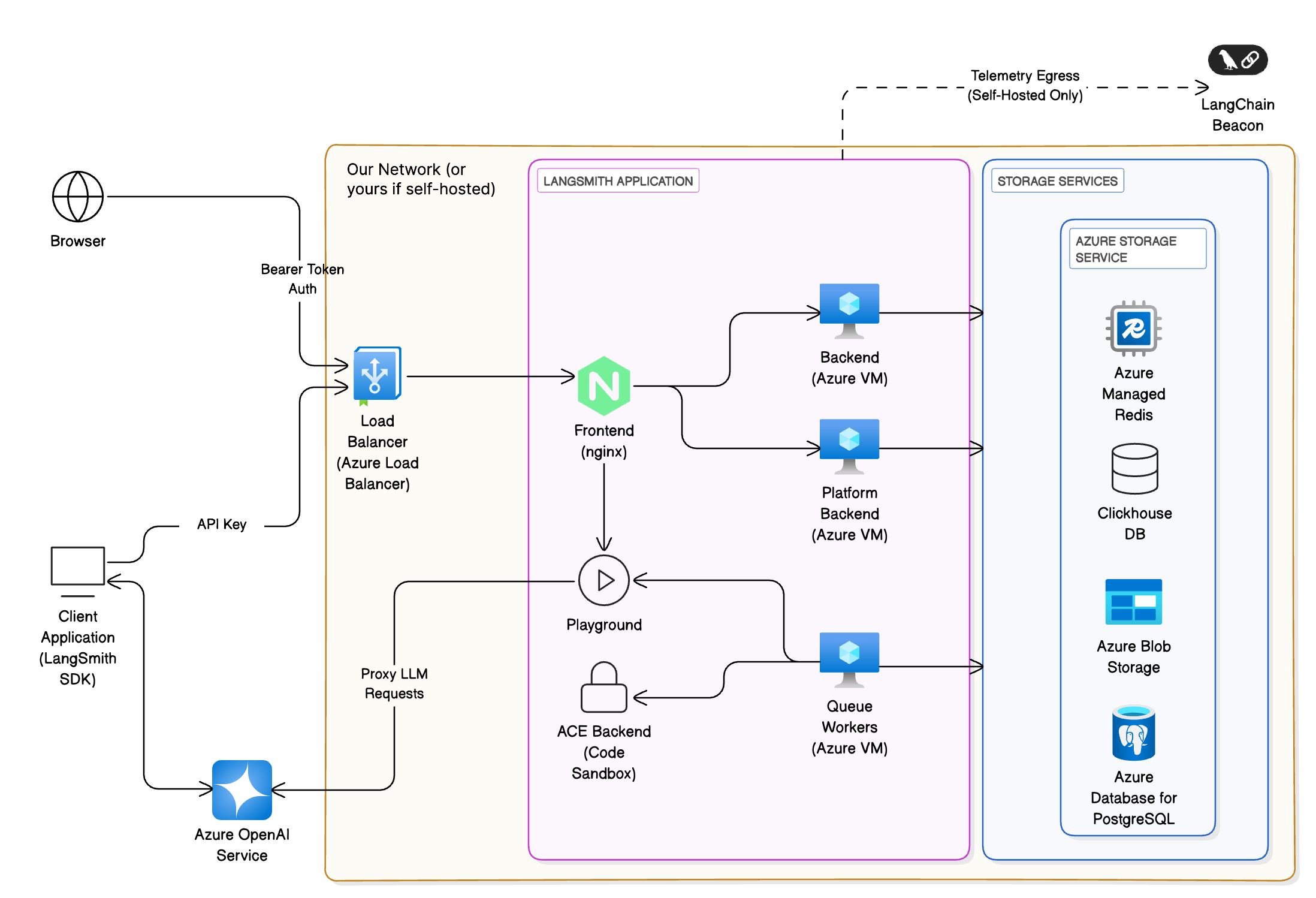 * **Client interfaces**: Users interact with LangSmith via a web browser or the LangChain SDK. All traffic terminates at an [Azure Load Balancer](https://azure.microsoft.com/en-us/products/load-balancer/) and is routed to the frontend (NGINX) within the [AKS](https://azure.microsoft.com/en-us/products/kubernetes-service/) cluster. API requests from SDKs are authenticated with API keys, while browser sessions use bearer tokens.
* **Application services**: The frontend routes requests to the backend, platform backend, playground and queue workers. These services run as Kubernetes deployments. The ACE backend executes code safely in an isolated sandbox.
* **Storage services**: The platform requires persistent storage for traces, metadata and caching. On Azure the recommended services are:
* **[Azure Database for PostgreSQL (Flexible Server)](https://azure.microsoft.com/en-us/products/postgresql/)** for transactional data (e.g., runs, projects). Azure's high-availability options provision a standby replica in another zone; data is synchronously committed to both primary and standby servers.
* **[Azure Managed Redis](https://azure.microsoft.com/en-us/products/managed-redis/)** for queues and caching. Best practices include storing small values and breaking large objects into multiple keys, using pipelining to maximize throughput and ensuring the client and server reside in the same region.
* **ClickHouse** for high-volume analytics of traces. Deploy a ClickHouse cluster on AKS using the open-source operator. Ensure replication across [availability zones](https://learn.microsoft.com/en-us/azure/reliability/availability-zones-overview) for durability.
* **[Azure Blob Storage](https://azure.microsoft.com/en-us/products/storage/blobs/)** for large artifacts. Use redundant storage configurations such as read-access geo-redundant (RA-GRS) or geo-zone-redundant (RA-GZRS) storage and design applications to read from the secondary region during an outage.
### LangSmith self-hosted models
You can host LangSmith on Azure using any of the three self-hosted models:
* [LangSmith Observability and Evaluation](/langsmith/self-hosted#self-host-langsmith-observability-and-evaluation): Deploy the UI and API services (frontend, backend, platform backend, playground, queue workers, and ACE). Use external Azure managed services for PostgreSQL, Redis, and blob storage.
* [Full LangSmith Platform Observability, Evaluation, and Agent Deployment](/langsmith/self-hosted#enable-langsmith-deployment): In addition to the application services, run the Agent Server [control plane](/langsmith/control-plane) and [data plane](/langsmith/data-plane) in your AKS cluster. The control plane is installed via Helm; the data plane consists of [Agent Server](/langsmith/agent-server) pods.
* [Standalone Agent Server](/langsmith/self-hosted/standalone-server): Deploy one or a few Agent Servers on AKS or Docker with external PostgreSQL and Redis. Use optional integration with the LangSmith UI for tracing. This model offers maximum flexibility and suits microservice architectures.
* [Hybrid](/langsmith/hybrid): Run your [data plane](/langsmith/data-plane) (Agent Servers and backing services) on Azure infrastructure while using LangChain's managed [control plane](/langsmith/control-plane) for the UI and APIs. The data plane uses the same Azure services (AKS, Azure Database for PostgreSQL, Azure Managed Redis) as the self-hosted models.
## Compute and networking on Azure
### Azure Kubernetes Service (AKS)
[AKS](https://azure.microsoft.com/en-us/products/kubernetes-service/) is the recommended compute platform for production deployments. This section outlines the key considerations for planning your setup.
#### Network model
Use [Azure CNI](https://learn.microsoft.com/en-us/azure/aks/configure-azure-cni) networking for production clusters. This model integrates the cluster into an existing virtual network, assigns IP addresses to each pod and node, and allows direct connectivity to on-premises or other Azure services. Ensure the subnet has enough IPs for nodes and pods, avoid overlapping address ranges and allocate additional IP space for scale-out events.
#### Ingress and load balancing
Use Kubernetes Ingress resources and controllers to distribute HTTP/HTTPS traffic. Ingress controllers operate at layer 7 and can route traffic based on URL paths and handle TLS termination. They reduce the number of public IP addresses compared to layer-4 load balancers. Use the [application routing add-on](https://learn.microsoft.com/en-us/azure/aks/app-routing) for managed NGINX ingress controllers integrated with [Azure DNS](https://azure.microsoft.com/en-us/products/dns/) and [Key Vault](https://azure.microsoft.com/en-us/products/key-vault/) for SSL certificates.
#### Web Application Firewall (WAF)
For additional protection against attacks, deploy a [WAF](https://learn.microsoft.com/en-us/azure/web-application-firewall/overview) such as [Azure Application Gateway](https://azure.microsoft.com/en-us/products/application-gateway/). A WAF filters traffic using OWASP rules and can terminate TLS before the traffic reaches your AKS cluster.
#### Network policies
Apply [Kubernetes network policies](https://learn.microsoft.com/en-us/azure/aks/use-network-policies) to restrict pod-to-pod traffic and reduce the impact of compromised workloads. Enable network policy support when creating the cluster and design rules based on application connectivity.
#### High availability
Configure node pools across [availability zones](https://learn.microsoft.com/en-us/azure/reliability/availability-zones-overview) and use Pod Disruption Budgets (PDB) and multiple replicas for all deployments. Set pod resource requests and limits; the [AKS resource management best practices](https://learn.microsoft.com/en-us/azure/aks/developer-best-practices-resource-management) recommend setting CPU and memory limits to prevent pods from consuming all resources. Use [Cluster Autoscaler](https://learn.microsoft.com/en-us/azure/aks/cluster-autoscaler) and [Vertical Pod Autoscaler](https://learn.microsoft.com/en-us/azure/aks/vertical-pod-autoscaler) to scale node pools and adjust pod resources automatically.
### Networking and identity
#### Virtual network integration
Deploy AKS into its own [virtual network](https://azure.microsoft.com/en-us/products/virtual-network/) and create separate subnets for the cluster, database, Redis, and storage endpoints. Use [Private Link](https://azure.microsoft.com/en-us/products/private-link/) and [service endpoints](https://learn.microsoft.com/en-us/azure/virtual-network/virtual-network-service-endpoints-overview) to keep traffic within your virtual network and avoid exposure to the public internet.
#### Authentication
Integrate LangSmith with [Microsoft Entra ID](https://www.microsoft.com/en-us/security/business/identity-access/microsoft-entra-id) (Azure AD) for single sign-on. Use Azure AD OAuth2 for bearer tokens and assign roles to control access to the UI and API.
## Storage and data services
### Azure Database for PostgreSQL
#### High availability
Use [Flexible Server](https://learn.microsoft.com/en-us/azure/postgresql/flexible-server/overview) with high-availability mode. Azure provisions a standby replica either within the same availability zone (zonal) or across zones (zone-redundant). Data is synchronously committed to both the primary and standby servers, ensuring that committed data is not lost. Zone-redundant configurations place the standby in a different zone to protect against zone outages but may add write latency.
#### Backups and disaster recovery
Enable [automatic backups](https://learn.microsoft.com/en-us/azure/postgresql/flexible-server/concepts-backup-restore) and configure geo-redundant backup storage to protect against region-wide outages. For critical applications, create read replicas in a secondary region.
#### Scaling
Choose an appropriate SKU that matches your workload; Flexible Server allows scaling compute and storage independently. Monitor metrics and configure alerts through [Azure Monitor](https://azure.microsoft.com/en-us/products/monitor/).
### Azure Managed Redis
#### Data modeling
Store small values and divide large objects into multiple keys; [Azure Managed Redis](https://azure.microsoft.com/en-us/products/managed-redis/) works best with many small keys. Large requests can cause timeouts; break up the data or increase bandwidth and connection concurrency.
#### Client performance
Use clients that support Redis pipelining to maximize network throughput. Place the client and Redis instance in the same region to minimize latency.
#### Persistence and redundancy
Choose a tier that provides replication and persistence. Configure Redis persistence or data backup for durability. For high-availability, use [active geo-replication](https://learn.microsoft.com/en-us/azure/redis/how-to-active-geo-replication) or zone-redundant caches depending on the tier.
### ClickHouse on Azure
ClickHouse is used for analytical workloads (traces and feedback). Deploy a ClickHouse cluster on AKS using Helm or the official operator. For resilience, replicate data across nodes and availability zones. Consider using [Azure Disks](https://azure.microsoft.com/en-us/products/storage/disks/) for local storage and mount them as StatefulSets. Alternatively, evaluate [Azure Data Explorer](https://azure.microsoft.com/en-us/products/data-explorer/) or [Azure Synapse Analytics](https://azure.microsoft.com/en-us/products/synapse-analytics/) if your enterprise policy restricts unmanaged databases.
### Azure Blob Storage
#### Redundancy
Choose a redundancy configuration based on your recovery objectives. Use [read-access geo-redundant (RA-GRS) or geo-zone-redundant (RA-GZRS) storage](https://learn.microsoft.com/en-us/azure/storage/common/storage-redundancy) and design applications to switch reads to the secondary region during a primary region outage.
#### Naming and partitioning
Use naming conventions that improve load balancing across partitions and plan for the maximum number of concurrent clients. Stay within Azure's scalability and capacity targets and partition data across multiple storage accounts if necessary.
#### Networking
Access blob storage through [private endpoints](https://learn.microsoft.com/en-us/azure/storage/common/storage-private-endpoints) or using SAS tokens and CORS rules to enable direct client access.
#### Uploads and retries
Use parallel uploads for large blobs and implement exponential backoff with retry policies when you approach scalability limits. Compress data on the client to reduce bandwidth but evaluate the CPU overhead.
## Security and access control
### Azure Key Vault
#### Separate vaults per application and environment
Store secrets such as database connection strings and API keys in [Azure Key Vault](https://azure.microsoft.com/en-us/products/key-vault/). Use a dedicated vault for each application and environment (dev, test, prod) to limit the impact of a security breach.
#### Access control
Use the [RBAC permission model](https://learn.microsoft.com/en-us/azure/key-vault/general/rbac-guide) to assign roles at the vault scope and restrict access to required principals. Restrict network access using Private Link and firewalls.
#### Data protection and logging
Enable [soft delete and purge protection](https://learn.microsoft.com/en-us/azure/key-vault/general/soft-delete-overview) to prevent accidental deletion. Turn on logging and configure alerts for Key Vault access events.
### Network security
#### Ingress isolation
Expose only the frontend service through the ingress controller or WAF. Other services should be internal and communicate through cluster networking.
#### RBAC and pod security
Use [Kubernetes RBAC](https://kubernetes.io/docs/reference/access-authn-authz/rbac/) to control who can deploy, modify, or read resources. Enable [pod security admission](https://kubernetes.io/docs/concepts/security/pod-security-admission/) to enforce baseline, restricted, or privileged profiles.
#### Secrets management
Mount secrets from Key Vault into pods using [CSI Secret Store](https://learn.microsoft.com/en-us/azure/aks/csi-secrets-store-driver). Avoid storing secrets in environment variables or configuration files.
## Observability and monitoring
### Azure Monitor
Use [Azure Monitor](https://azure.microsoft.com/en-us/products/monitor/) for metrics, logs, and alerting. Proactive monitoring involves configuring alerts on key signals like node CPU/memory utilization, pod status, and service latency. Azure Monitor alerts notify you when predefined thresholds are exceeded.
### Managed Prometheus and Grafana
Enable [Azure Monitor managed Prometheus](https://learn.microsoft.com/en-us/azure/azure-monitor/essentials/prometheus-metrics-overview) to collect Kubernetes metrics. Combine it with [Grafana dashboards](https://azure.microsoft.com/en-us/products/managed-grafana/) for visualization. Define service-level objectives (SLOs) and configure alerts accordingly.
### Container Insights
Install [Container Insights](https://learn.microsoft.com/en-us/azure/azure-monitor/containers/container-insights-overview) to capture logs and metrics from AKS nodes and pods. Use [Azure Log Analytics workspaces](https://learn.microsoft.com/en-us/azure/azure-monitor/logs/log-analytics-overview) to query and analyze logs.
### Application logging
Ensure LangSmith services emit logs to stdout/stderr and forward them via [Fluent Bit](https://fluentbit.io/) or the Azure Monitor agent.
***
[Edit the source of this page on GitHub.](https://github.com/langchain-ai/docs/edit/main/src/langsmith/azure-self-hosted.mdx)
[Connect these docs programmatically](/use-these-docs) to Claude, VSCode, and more via MCP for real-time answers.
* **Client interfaces**: Users interact with LangSmith via a web browser or the LangChain SDK. All traffic terminates at an [Azure Load Balancer](https://azure.microsoft.com/en-us/products/load-balancer/) and is routed to the frontend (NGINX) within the [AKS](https://azure.microsoft.com/en-us/products/kubernetes-service/) cluster. API requests from SDKs are authenticated with API keys, while browser sessions use bearer tokens.
* **Application services**: The frontend routes requests to the backend, platform backend, playground and queue workers. These services run as Kubernetes deployments. The ACE backend executes code safely in an isolated sandbox.
* **Storage services**: The platform requires persistent storage for traces, metadata and caching. On Azure the recommended services are:
* **[Azure Database for PostgreSQL (Flexible Server)](https://azure.microsoft.com/en-us/products/postgresql/)** for transactional data (e.g., runs, projects). Azure's high-availability options provision a standby replica in another zone; data is synchronously committed to both primary and standby servers.
* **[Azure Managed Redis](https://azure.microsoft.com/en-us/products/managed-redis/)** for queues and caching. Best practices include storing small values and breaking large objects into multiple keys, using pipelining to maximize throughput and ensuring the client and server reside in the same region.
* **ClickHouse** for high-volume analytics of traces. Deploy a ClickHouse cluster on AKS using the open-source operator. Ensure replication across [availability zones](https://learn.microsoft.com/en-us/azure/reliability/availability-zones-overview) for durability.
* **[Azure Blob Storage](https://azure.microsoft.com/en-us/products/storage/blobs/)** for large artifacts. Use redundant storage configurations such as read-access geo-redundant (RA-GRS) or geo-zone-redundant (RA-GZRS) storage and design applications to read from the secondary region during an outage.
### LangSmith self-hosted models
You can host LangSmith on Azure using any of the three self-hosted models:
* [LangSmith Observability and Evaluation](/langsmith/self-hosted#self-host-langsmith-observability-and-evaluation): Deploy the UI and API services (frontend, backend, platform backend, playground, queue workers, and ACE). Use external Azure managed services for PostgreSQL, Redis, and blob storage.
* [Full LangSmith Platform Observability, Evaluation, and Agent Deployment](/langsmith/self-hosted#enable-langsmith-deployment): In addition to the application services, run the Agent Server [control plane](/langsmith/control-plane) and [data plane](/langsmith/data-plane) in your AKS cluster. The control plane is installed via Helm; the data plane consists of [Agent Server](/langsmith/agent-server) pods.
* [Standalone Agent Server](/langsmith/self-hosted/standalone-server): Deploy one or a few Agent Servers on AKS or Docker with external PostgreSQL and Redis. Use optional integration with the LangSmith UI for tracing. This model offers maximum flexibility and suits microservice architectures.
* [Hybrid](/langsmith/hybrid): Run your [data plane](/langsmith/data-plane) (Agent Servers and backing services) on Azure infrastructure while using LangChain's managed [control plane](/langsmith/control-plane) for the UI and APIs. The data plane uses the same Azure services (AKS, Azure Database for PostgreSQL, Azure Managed Redis) as the self-hosted models.
## Compute and networking on Azure
### Azure Kubernetes Service (AKS)
[AKS](https://azure.microsoft.com/en-us/products/kubernetes-service/) is the recommended compute platform for production deployments. This section outlines the key considerations for planning your setup.
#### Network model
Use [Azure CNI](https://learn.microsoft.com/en-us/azure/aks/configure-azure-cni) networking for production clusters. This model integrates the cluster into an existing virtual network, assigns IP addresses to each pod and node, and allows direct connectivity to on-premises or other Azure services. Ensure the subnet has enough IPs for nodes and pods, avoid overlapping address ranges and allocate additional IP space for scale-out events.
#### Ingress and load balancing
Use Kubernetes Ingress resources and controllers to distribute HTTP/HTTPS traffic. Ingress controllers operate at layer 7 and can route traffic based on URL paths and handle TLS termination. They reduce the number of public IP addresses compared to layer-4 load balancers. Use the [application routing add-on](https://learn.microsoft.com/en-us/azure/aks/app-routing) for managed NGINX ingress controllers integrated with [Azure DNS](https://azure.microsoft.com/en-us/products/dns/) and [Key Vault](https://azure.microsoft.com/en-us/products/key-vault/) for SSL certificates.
#### Web Application Firewall (WAF)
For additional protection against attacks, deploy a [WAF](https://learn.microsoft.com/en-us/azure/web-application-firewall/overview) such as [Azure Application Gateway](https://azure.microsoft.com/en-us/products/application-gateway/). A WAF filters traffic using OWASP rules and can terminate TLS before the traffic reaches your AKS cluster.
#### Network policies
Apply [Kubernetes network policies](https://learn.microsoft.com/en-us/azure/aks/use-network-policies) to restrict pod-to-pod traffic and reduce the impact of compromised workloads. Enable network policy support when creating the cluster and design rules based on application connectivity.
#### High availability
Configure node pools across [availability zones](https://learn.microsoft.com/en-us/azure/reliability/availability-zones-overview) and use Pod Disruption Budgets (PDB) and multiple replicas for all deployments. Set pod resource requests and limits; the [AKS resource management best practices](https://learn.microsoft.com/en-us/azure/aks/developer-best-practices-resource-management) recommend setting CPU and memory limits to prevent pods from consuming all resources. Use [Cluster Autoscaler](https://learn.microsoft.com/en-us/azure/aks/cluster-autoscaler) and [Vertical Pod Autoscaler](https://learn.microsoft.com/en-us/azure/aks/vertical-pod-autoscaler) to scale node pools and adjust pod resources automatically.
### Networking and identity
#### Virtual network integration
Deploy AKS into its own [virtual network](https://azure.microsoft.com/en-us/products/virtual-network/) and create separate subnets for the cluster, database, Redis, and storage endpoints. Use [Private Link](https://azure.microsoft.com/en-us/products/private-link/) and [service endpoints](https://learn.microsoft.com/en-us/azure/virtual-network/virtual-network-service-endpoints-overview) to keep traffic within your virtual network and avoid exposure to the public internet.
#### Authentication
Integrate LangSmith with [Microsoft Entra ID](https://www.microsoft.com/en-us/security/business/identity-access/microsoft-entra-id) (Azure AD) for single sign-on. Use Azure AD OAuth2 for bearer tokens and assign roles to control access to the UI and API.
## Storage and data services
### Azure Database for PostgreSQL
#### High availability
Use [Flexible Server](https://learn.microsoft.com/en-us/azure/postgresql/flexible-server/overview) with high-availability mode. Azure provisions a standby replica either within the same availability zone (zonal) or across zones (zone-redundant). Data is synchronously committed to both the primary and standby servers, ensuring that committed data is not lost. Zone-redundant configurations place the standby in a different zone to protect against zone outages but may add write latency.
#### Backups and disaster recovery
Enable [automatic backups](https://learn.microsoft.com/en-us/azure/postgresql/flexible-server/concepts-backup-restore) and configure geo-redundant backup storage to protect against region-wide outages. For critical applications, create read replicas in a secondary region.
#### Scaling
Choose an appropriate SKU that matches your workload; Flexible Server allows scaling compute and storage independently. Monitor metrics and configure alerts through [Azure Monitor](https://azure.microsoft.com/en-us/products/monitor/).
### Azure Managed Redis
#### Data modeling
Store small values and divide large objects into multiple keys; [Azure Managed Redis](https://azure.microsoft.com/en-us/products/managed-redis/) works best with many small keys. Large requests can cause timeouts; break up the data or increase bandwidth and connection concurrency.
#### Client performance
Use clients that support Redis pipelining to maximize network throughput. Place the client and Redis instance in the same region to minimize latency.
#### Persistence and redundancy
Choose a tier that provides replication and persistence. Configure Redis persistence or data backup for durability. For high-availability, use [active geo-replication](https://learn.microsoft.com/en-us/azure/redis/how-to-active-geo-replication) or zone-redundant caches depending on the tier.
### ClickHouse on Azure
ClickHouse is used for analytical workloads (traces and feedback). Deploy a ClickHouse cluster on AKS using Helm or the official operator. For resilience, replicate data across nodes and availability zones. Consider using [Azure Disks](https://azure.microsoft.com/en-us/products/storage/disks/) for local storage and mount them as StatefulSets. Alternatively, evaluate [Azure Data Explorer](https://azure.microsoft.com/en-us/products/data-explorer/) or [Azure Synapse Analytics](https://azure.microsoft.com/en-us/products/synapse-analytics/) if your enterprise policy restricts unmanaged databases.
### Azure Blob Storage
#### Redundancy
Choose a redundancy configuration based on your recovery objectives. Use [read-access geo-redundant (RA-GRS) or geo-zone-redundant (RA-GZRS) storage](https://learn.microsoft.com/en-us/azure/storage/common/storage-redundancy) and design applications to switch reads to the secondary region during a primary region outage.
#### Naming and partitioning
Use naming conventions that improve load balancing across partitions and plan for the maximum number of concurrent clients. Stay within Azure's scalability and capacity targets and partition data across multiple storage accounts if necessary.
#### Networking
Access blob storage through [private endpoints](https://learn.microsoft.com/en-us/azure/storage/common/storage-private-endpoints) or using SAS tokens and CORS rules to enable direct client access.
#### Uploads and retries
Use parallel uploads for large blobs and implement exponential backoff with retry policies when you approach scalability limits. Compress data on the client to reduce bandwidth but evaluate the CPU overhead.
## Security and access control
### Azure Key Vault
#### Separate vaults per application and environment
Store secrets such as database connection strings and API keys in [Azure Key Vault](https://azure.microsoft.com/en-us/products/key-vault/). Use a dedicated vault for each application and environment (dev, test, prod) to limit the impact of a security breach.
#### Access control
Use the [RBAC permission model](https://learn.microsoft.com/en-us/azure/key-vault/general/rbac-guide) to assign roles at the vault scope and restrict access to required principals. Restrict network access using Private Link and firewalls.
#### Data protection and logging
Enable [soft delete and purge protection](https://learn.microsoft.com/en-us/azure/key-vault/general/soft-delete-overview) to prevent accidental deletion. Turn on logging and configure alerts for Key Vault access events.
### Network security
#### Ingress isolation
Expose only the frontend service through the ingress controller or WAF. Other services should be internal and communicate through cluster networking.
#### RBAC and pod security
Use [Kubernetes RBAC](https://kubernetes.io/docs/reference/access-authn-authz/rbac/) to control who can deploy, modify, or read resources. Enable [pod security admission](https://kubernetes.io/docs/concepts/security/pod-security-admission/) to enforce baseline, restricted, or privileged profiles.
#### Secrets management
Mount secrets from Key Vault into pods using [CSI Secret Store](https://learn.microsoft.com/en-us/azure/aks/csi-secrets-store-driver). Avoid storing secrets in environment variables or configuration files.
## Observability and monitoring
### Azure Monitor
Use [Azure Monitor](https://azure.microsoft.com/en-us/products/monitor/) for metrics, logs, and alerting. Proactive monitoring involves configuring alerts on key signals like node CPU/memory utilization, pod status, and service latency. Azure Monitor alerts notify you when predefined thresholds are exceeded.
### Managed Prometheus and Grafana
Enable [Azure Monitor managed Prometheus](https://learn.microsoft.com/en-us/azure/azure-monitor/essentials/prometheus-metrics-overview) to collect Kubernetes metrics. Combine it with [Grafana dashboards](https://azure.microsoft.com/en-us/products/managed-grafana/) for visualization. Define service-level objectives (SLOs) and configure alerts accordingly.
### Container Insights
Install [Container Insights](https://learn.microsoft.com/en-us/azure/azure-monitor/containers/container-insights-overview) to capture logs and metrics from AKS nodes and pods. Use [Azure Log Analytics workspaces](https://learn.microsoft.com/en-us/azure/azure-monitor/logs/log-analytics-overview) to query and analyze logs.
### Application logging
Ensure LangSmith services emit logs to stdout/stderr and forward them via [Fluent Bit](https://fluentbit.io/) or the Azure Monitor agent.
***
[Edit the source of this page on GitHub.](https://github.com/langchain-ai/docs/edit/main/src/langsmith/azure-self-hosted.mdx)
[Connect these docs programmatically](/use-these-docs) to Claude, VSCode, and more via MCP for real-time answers.